Business
These Plumbing Pros Are Using a ‘Jackpot’ Strategy to Fix Your Boring Bathroom. Their Colorful Business Made $3.9 Million Last Year.
Reading in data-saving mode. Read full article from Entrepreneur website.
Published 10/14/2026 11:06:35 AM
Plumbing Pros' Bathroom Business Made $3.9M Last Year: sproos!
Key Takeaways
- Ten years ago, Fix began to consider what millennials wanted to see in their bathrooms.
- He and Reinecker officially launched their home and bath brand sproos! in 2022.
- The company is on track for $10 million in revenue this year.
About a decade ago, plumbing-industry veteran Benjamin Fix was tasked with creating a bathroom collection for the next generation of consumers — at the time, millennials.

As Fix considered what might resonate with young shoppers, a few problems became apparent. Most millennials were renters, not homeowners who could make permanent changes to their bathrooms. Additionally, the plumbing industry’s “antiquated” messaging didn’t appeal to them, and the products themselves lacked imagination.
“We had three colors, which was chrome, chrome and chrome,” Fix tells Entrepreneur. “And then there was nothing else. This next generation wants to have colors to express themselves. They want to have pink or green.”
If the plumbing industry was going to successfully cater to young consumers, its products needed to evolve. And, though Gen Z is now the newest set of shoppers on the scene, an interest in fun, colorful designs remains consistent.
Starting a business in 2022: sproos!
Fix teamed up with his former colleague, Greg Reinecker, who became a co-founder and product designer at their business: sproos!, a renter-friendly, direct-to-consumer home and bath brand.
Fix’s partner Cecile Scius also joined the effort as the company’s manager of customer success and community lead.
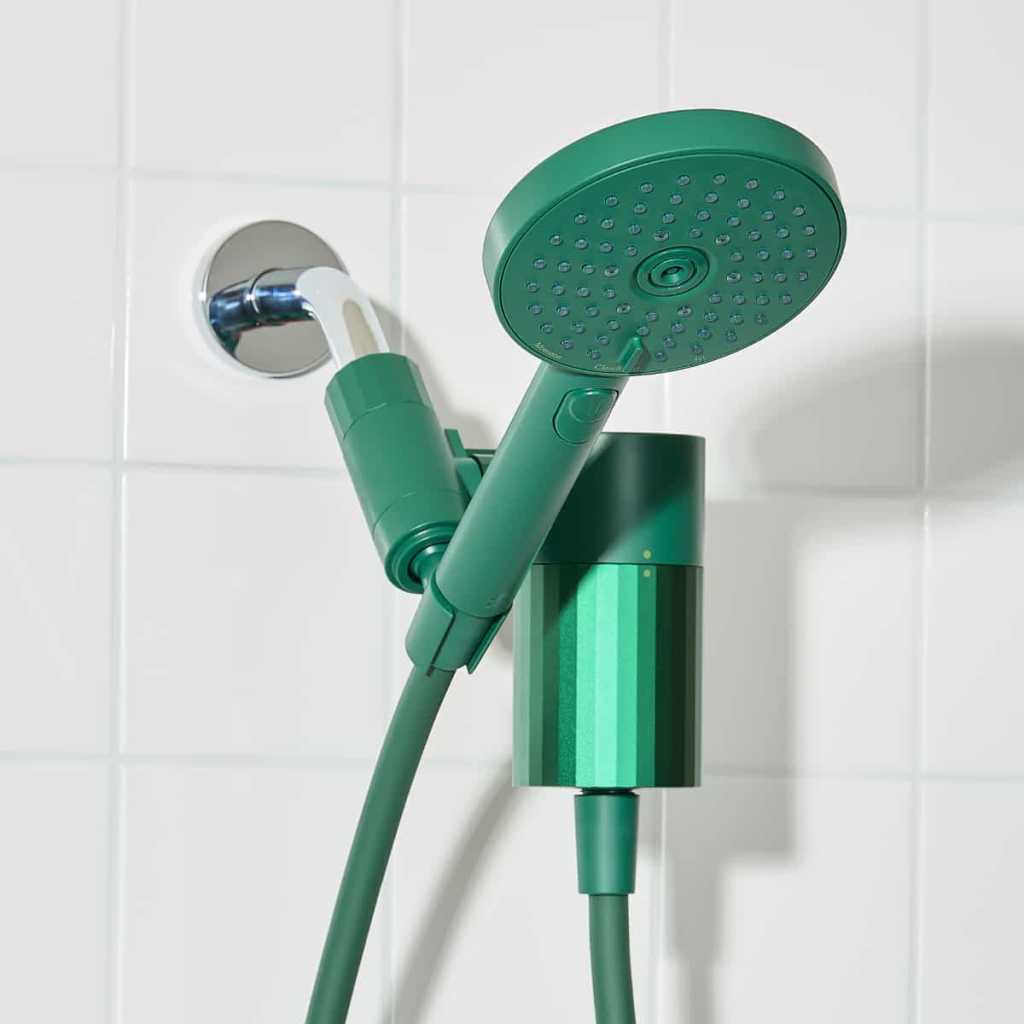
Sproos! officially launched in November 2022 after the co-founders raised about $250,000 from professional contacts and friends, and it has been growing since.
The business brought in $3.9 million in revenue in 2025 and is on track to cross the $10 million mark this year. It also boasts about 35,000 active subscribers receiving its shower filtration cartridges (roughly 70% of new customers opt in) and a monthly churn rate under 3%.
Entrepreneur sat down with Fix and Scius to learn more about how they’re cultivating a loyal community that helps sproos! keep leveling up.
Listening to customer feedback leads to filtration
Like most new businesses angling for adoption, sproos! tapped into social media from the start. The company sent products to lifestyle creators on Instagram, and more recently TikTok, to generate bathroom-makeover content. College students hoping to spruce up their rental spaces were a particularly strong pool.
However, unlike some brands that might consider those published posts the end goal, for sproos!, they’re only one facet of an ongoing — and invaluable — dynamic that hinges on deep consumer relationships.
Listening to customer feedback led to two critical additions at the company: a shower head filtration product and its supporting subscription model.
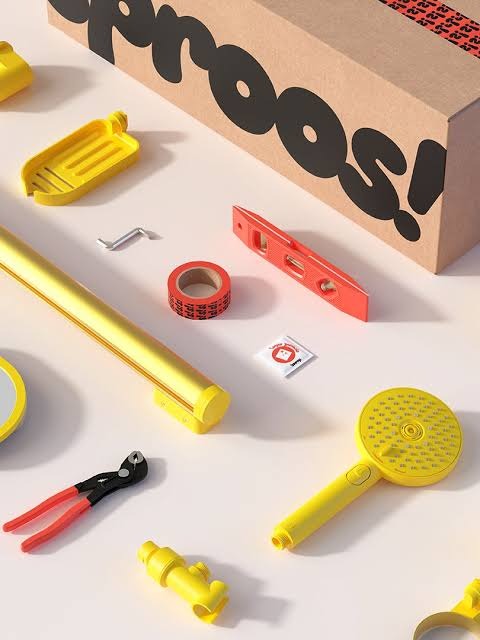
Sproos! holds round tables with its most loyal community members, dubbed “super fans,” four times a year, which helped develop its first filtration product.
The company learned exactly what people wanted, from pain-point removals to aesthetic preferences, so it could address them before its product ever hit the market. The development process took place over about two years.
Sproos!’s subscription model, which delivers a new filter cartridge to subscribers every three months, also emerged as a result of those discussions — and proved a boon for business.
“This was the jackpot,” Fix says. “The customers are super happy. They’re telling us how much they love our filtration. And we can create a recurring revenue model. That’s a game-changer.”
The subscription model provides helpful stability and a foundation on which to build, Scius adds.
A monthly feedback report helps solve problems quickly
In addition, every month, sproos! generates a report based on what people are calling, writing or posting on social media about. “ We extract data from all the customer communication that we have in order to see trends [so that] we can improve,” Scius says.
Sproos! can use that data to fix existing problems, develop new products or launch highly requested colors.
For example, the report once highlighted a shower head leak that led to a significant unlock.
After noting an increase in leaks month over month, the company’s engineering department drilled down on the cause: the washers on the hose. The “little donuts” were small and transparent, so if they happened to fall off, many people didn’t realize it.
Sproos! added a lip to the mold for extra security — and it became an industry standard.
“ Our customers are not just informing product betterments within our company, but when they see what we’re doing, it then spreads to all of the major brands as well,” Scius says. “Because if we’re having the problem, we’re not the only ones. We’re just really adamant about doing something about it.”

Selling on Amazon and expanding a HomeGoods partnership
Following its success with DTC, sproos! began to sell on Amazon and continues to explore brick-and-mortar expansion. “Of course, we have ambitions to grow,” Fix says, “and for us, going into retail is a good way to reach new audiences, and to bring people into our ecosystem.”
The company is adding to its shower-system product line, branching into storage, curtains, bath mats, lighting and accessories, as it focuses on an expanding HomeGoods partnership and upcoming Home Depot rollout.
And that initial HomeGoods placement? It, too, was a direct result of the company’s community, which cited HomeGoods as one of their favorite places to shop.
The company launched with a small HomeGoods placement in the U.S. last summer. It went well and brought larger second and third orders, and interest from Canada HomeGoods.
“You don’t have to go from zero to 100 in one step,” Scius says. “Growing a business is incremental. The goal is really to continuously improve, to continuously grow, to continuously learn. That’s how you’re going to get to the finish line.”
Urban Outfitters recently featured sproos! in a back-to-school curation, and the company partnered with student housing developer Greystar for on-campus pop-ups, which pushed local sales up 200% and got its products built into lease-renewal incentives.
Sproos! started on a mission to understand its target consumer, and the company continues to see success because of that ongoing commitment. The market will let you know exactly what it wants — but you have to be willing to listen, Fix notes.
“The consumers will tell you,” Fix says. “Be open to that feedback, and don’t overanalyze it. If 10 people ask for pink, just do pink. Be humble enough to have your mind changed by the people who you want to reach.”
§
Effective product pages help online shoppers decide whether an item fits their needs and what buying it involves. A beautiful photograph gets attention. Product details such as dimensions, available sizes, delivery details, and a clear price help turn that attention into a purchase.
Even established retailers miss these basics. In its benchmark of leading U.S. and European retailers, updated in March 2026, Baymard Institute rated 52% of desktop sites and 62% of mobile sites “mediocre or worse” for product-page usability1.
Product-page changes can affect revenue, too. In a 27-day test for Life Pro Fitness, agency Media Contour made product images, key details, and buying buttons visible without needing to scroll. Testing vendor Wingify reported that the revised page generated $0.67 more revenue per visitor than the original2.
If you are building a new store, follow the five tips below as you create your product pages. Have those pages ready before running ads that send shoppers to them.
If you already have an online store, choose one product page to improve. Reference these steps to check whether it answers shoppers’ questions and lets them add the right item to their cart.
1. Answer shoppers’ questions in the product description
Identify the main question a shopper needs answered before buying. Look for questions customers ask repeatedly or misunderstandings behind returns. For a new product, start with fit, compatibility, or what is included. Confirm the answer against your product specifications, then put it near the start of the description.
For example, consider a pet-supply retailer selling a dog harness. Someone choosing their first harness needs measurements and adjustment details to judge the fit. Someone replacing a harness they already own needs to recognize the same model and size. The page should make both tasks straightforward.
Also, use consistent labels and units across similar products to make comparisons easier. Include limitations, such as incompatible models or items sold separately, so shoppers can rule out an unsuitable purchase.
In e-commerce platform BigCommerce, for instance, online sellers can use the product description and custom fields—additional facts such as material or compatibility—to present these details. Preview the product page to check that shoppers can find the information they need.
Then, use those same facts to help shoppers recognize the item in search results. In BigCommerce’s page title field, use the product name and a relevant detail, such as its model or material. Avoid repeating keywords or giving every product the same title.
2. Give every product image a question to answer
Plan your gallery around what someone needs to inspect. Show the whole product, a useful detail, and the product in use. For example, a lighting retailer could photograph a lamp beside a chair to show its scale and how it lights a reading space. A close-up of the switch shows how someone would operate it. Together, these images help shoppers picture using the lamp at home. Keep written dimensions available as well.
The same Baymard overview describes how shoppers use images to judge size and can struggle when photographs lack a familiar reference.
If you sell a bundle, make clear which pictured items are included. For products that need assembly or demonstration, you might even consider creating a short video. Add alt text: a short description of the useful information in an image. Screen-reader software can read that description aloud or present it in braille. Keep essential instructions available as text as well.
BigCommerce supports product images, images for variants such as different colors, and YouTube-hosted product videos. Check that your gallery presents the right item as shoppers change their selection.
3. Make choices, prices, and recurring charges clear
Keep size, color, quantity, and purchase options close to the buying button. Label them plainly, show the current selection, and make unavailable choices recognizable. If the size options fit on the screen, show them as labeled buttons, such as S, M, and L. This lets shoppers see which sizes are available without opening a menu, as the Baymard overview explains.
Place helpful links beside the choice it explains. For the dog harness, for example, consider putting a measurement guide beside the size selector so shoppers can check the fit before choosing. Keep it visible or provide a clearly labeled link that works by touch and keyboard.
In BigCommerce, online sellers can configure choices such as size and color through product variants and options. Then check that the displayed price and availability match the shopper’s selection. For multipacks, show both the pack total and the unit price. Make the full pack price easy to find so shoppers know what they will be charged.
If you offer subscriptions, let shoppers explicitly choose between a one-time purchase and a recurring order. Put the recurring charge, delivery frequency, and change or cancellation terms beside that choice so shoppers can compare the commitments before selecting. Confirm that these terms match how your subscription service works. Select a subscription yourself and verify that checkout shows the plan, price, and frequency you chose.
4. Make sure delivery, returns, and reviews are easy to find
A shopper who needs an item by a particular date wants to know whether it will arrive in time. Show a delivery estimate for their destination. Put a short explanation of shipping and returns near add to cart, with links to the full policies.
Show shipping fees or explain how they will be calculated. Clearly describe return windows, fees, and exclusions that matter for the item. If pickup is offered, distinguish stock at the selected location from stock elsewhere. Avoid presenting an estimate as a confirmed promise.
Also consider making reassurances that are specific to the purchase. Using the dog harness as an example again, you’d want to explain whether a shopper can exchange it if the fit is wrong and which conditions apply. That answers the practical concerns that a badge saying “Shop with Confidence” leaves unresolved. Use only promises your business can honor.
Customer reviews provide another way to assess the product. Show the review rating, text, reviewer’s display name, and date on the relevant product page. If reviews come from another service, name that service. These details help shoppers understand whose experience they are reading and how recent it is.
5. Test the path from product page to cart
Shoppers need to know that the page has registered their choices and whether adding an item succeeded. Open your chosen product page on your phone. If a required option starts unselected, try adding the item before choosing it. The page should tell you what to select or explain why “Add to cart” is unavailable.
If the product has options, choose them, then change one selection. Check that the price, availability, and any option-specific images match. Add the item. While the request is processing, the page should make that clear. Once it succeeds, a confirmation or the cart itself should show what was added. If an error occurs, it should explain how to continue without losing other selections.
From there, make sure to check the item’s quantity, options, and price in the cart. If you chose a size or color, return to the product page and check whether it still shows that selection. These checks help catch a wrong selection or an uncertain result before a shopper encounters it.
Shoppers who cannot use a mouse need to select options and add products using a keyboard. To check that they can, repeat the steps above on a computer without the mouse. Use Tab to move forward between controls and Shift+Tab to move back. A visible outline or other marker should show which control you are about to use. Press Enter to activate links and Enter or Space for buttons. In a drop-down list, such as a size selector, use the arrow keys to move through the options.
Shoppers who need larger text must still be able to read product details and reach Add to cart. Use the browser’s Zoom control to enlarge the page to 200% and try the same steps again. Check for overlapping text or controls that disappear. Across all these checks, record anything that prevents choosing the product, adding it, or correcting a mistake.
Keep improving one page at a time
Clear facts and images help shoppers judge the product; clear choices, terms, and working controls help them act on that decision. Choose one issue from your review to fix first. Give priority to a problem that prevents adding the correct item to the cart. If shoppers can add the correct item, address an unanswered question that could lead someone to buy the wrong product.
Record what you changed and when. If you have sales reports, compare purchases and revenue for the product over equal periods before and after the change. Note any promotions or changes in visitor numbers that could also explain the results. Customer questions, order corrections, and return reasons can help you check whether the same misunderstanding persists.
For more examples, explore BigCommerce’s product-page guide, then apply the same review to the next product page.
1 Product Page UX 2026: 10 Pitfalls and Best Practices (Baymard Institute)
2 Media Contour uses split URL testing to improve the revenue from product pages (Wingify)